From Dynamics CRM On-Premises to Dynamics 365 Online: A No Drama Migration Playbook
If you’re still using Microsoft Dynamics CRM on‑premises, you’ve likely noticed the challenges. Changes take longer, upgrades feel risky, and every new integration feels like a project. Moving to Dynamics 365 Online isn’t just an upgrade; it’s a way to step away from managing the infrastructure and focus on improving how sales and service teams operate. This post will cover why organizations decide to move, what benefits you get from the cloud, and how VNB Consulting typically handles a migration. This includes our data approach using a SQL staging layer, Power Automate flows, and custom plugins to maintain relationships, history, and key audit details.
Still on On‑Prem CRM? Here’s What It’s Costing You
“Digital Transformation” can sound like a buzzword, but in CRM, it’s straightforward: make it easier for your teams to sell, serve, and report without battling the system. Many companies still use older Dynamics CRM versions, like CRM 2011 or 2013. They still work, but over time, they start to slow you down in the following “predictable” ways:
- You’re managing servers instead of improving CRM: On-prem means you own everything: patching, backups, monitoring, storage, and hardware updates. As usage increases, so does the admin workload. In the cloud, much of the heavy lifting is taken off your plate.
- Scaling requires planning meetings and often new hardware: If you need more users, storage, or better performance, on-premises often leads to capacity planning and change windows. Sometimes, you have to buy more equipment “just in case.” With Dynamics 365 Online, scaling is more about capacity and licensing than a data-center project.
- Upgrades feel like major events: Big on-prem upgrades can be disruptive with planning, regression testing, downtime, and concerns about what could go wrong. This often results in long gaps between upgrades, making you miss out on newer automation, reporting, and AI features. With Online, improvements come continuously instead of in big jumps.
- Remote work becomes more complicated than it should be: Older setups are often tuned for the office network, making secure access for mobile and remote teams tricky. Dynamics 365 Online is designed for access from anywhere, allowing you to maintain strong identity and access policies.
- Integrations turn into a “spaghetti diagram” over time: On-premise CRMs usually gather one-off jobs, custom middleware, and point-to-point connections. The more systems you add, the more fragile and costly it becomes to make changes. The cloud allows easier integration using modern APIs and Microsoft services without so many fragile parts.
- Staying secure is a constant effort: On-prem security isn’t “set it and forget it.” It involves patching, monitoring, and keeping controls up to date, often on older software that limits security options. In Microsoft’s cloud, you start with a modern security baseline: updates, encryption, identity controls like MFA, and broad compliance coverage. You still need governance, but the platform is easier to keep current.
When you combine all that, the real cost isn’t just infrastructure. It’s speed! Teams operate slower, improvements get delayed, and risks increase. That’s why many organizations see moving to a cloud CRM as a chance to modernize their environment.
What You Get with Dynamics 365 Online (Beyond “It’s in the Cloud”)
So, what do you actually get when you move to Dynamics 365 Online? Beyond “it’s in the cloud,” below are the practical benefits customers usually care about:
- Grow without rebuilding the platform: Adding users and capacity no longer needs new servers or long change windows. You can scale up or down as the business changes.
- It works well with Microsoft 365 and the Power Platform: Dynamics 365 Online connects easily with Teams, SharePoint, Power BI, Power Apps, and Power Automate. This makes it simpler to create real workflows, like turning an email into a case, notifying a team in Teams, and tracking the full resolution path in CRM. When you need deeper integration, Azure Logic Apps and other Azure services offer scalable options.
- A stronger security starting point: You get a modern cloud foundation that includes encryption, ongoing updates, and controls that meet common compliance needs. You still set your access rules and governance, but you’re not constantly trying to keep the platform updated.
- You’re no longer stuck waiting years for new features: Online updates roll out continually, and this is usually where new capabilities, including Copilot experiences, appear first.
- Better day-to-day experience for users: The interface and mobile experience are designed for modern work. This means faster adoption, fewer workarounds, and less training hassle.
- More predictable operations: Many teams swap big, occasional infrastructure spending for a simpler operating model. This frees up IT time that earlier used to go into maintenance and upgrades.

How VNB Runs a Smooth Dynamics 365 Migration Strategy
Now for the part everyone worries about: “How hard is this going to be?” A CRM migration involves a lot of factors, including data, security, integrations, and, most importantly, user adoption. As a Microsoft Partner, VNB Consulting uses a practical and repeatable approach to help customers transition from on-premises Dynamics CRM to Dynamics 365 Online. We typically break it down into three phases: Discovery, Technical Design, and Execution.
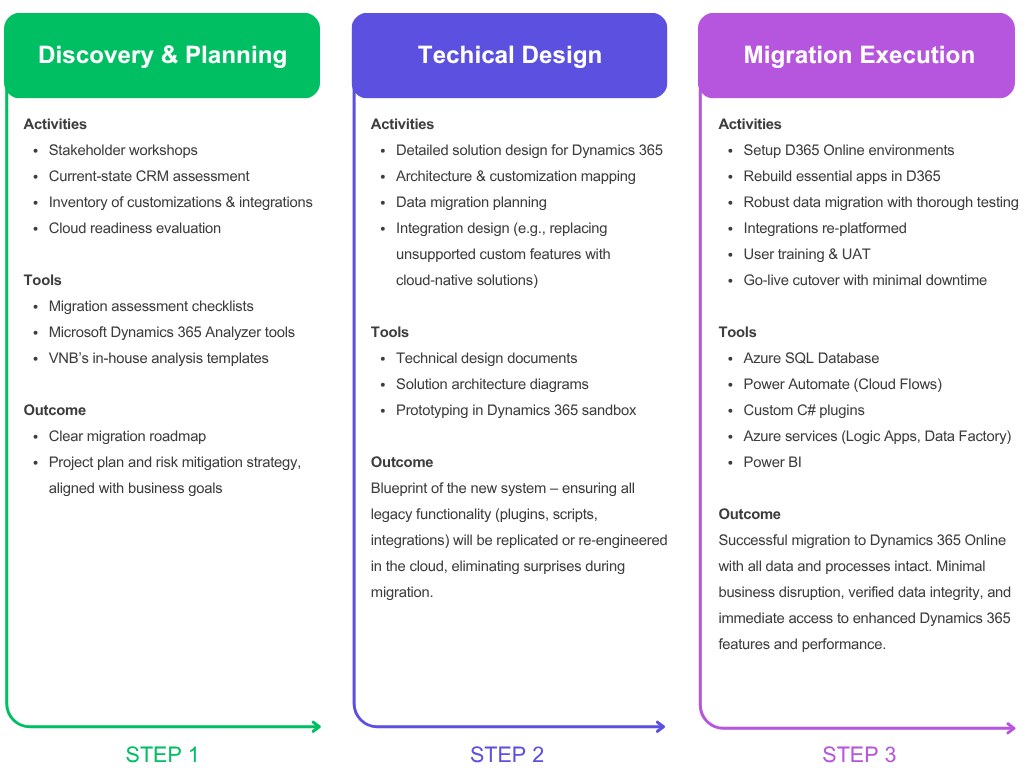
Step 1: Discovery (Find the Gotchas Early)
First, we need to understand the full picture because surprises can make migrations painful. In the discovery phase, we meet with business and technical stakeholders to understand how CRM is currently used and what must continue to function from day one. We create an inventory of the environment from start to finish, including entities, forms, views, security roles, plugins, workflows, reports, third-party solutions, and integrations. The result is a clear list of what we’ll move, what we’ll update, what we’ll retire, along with a roadmap and risk list that keeps everyone on the same page.
By the end of the discovery phase, you’re not guessing—you have a plan that includes scope, sequencing, timelines, dependencies, and task assignments. This clarity makes the rest of the project easier, especially if your CRM has years of customizations and numerous downstream systems.
Step 2: Technical Design (Plan the Cloud Build)
Next, we turn what we learned into a cloud-ready build plan. In this phase, we define the target setup in Dynamics 365 Online, match your needs to what D365 does best, and determine how to address each part of the legacy solution. If an on-premises method doesn’t carry over smoothly, we create a modern alternative. This might involve rebuilding custom experiences as model-driven apps or Canvas apps, moving older workflows into Power Automate, and shifting more complex logic into plugins and Azure services, such as Azure Functions. For higher-risk areas, we validate early with proofs of concept to avoid leaving anything to chance.
This is also when we get specific about data migration: what maps where, what needs cleaning, and how we’ll handle notes, attachments, and activity history. If you need to keep historical data—like original ownership or timestamps—we plan for that upfront, so you don’t lose important context after going live.
Step 3: Execution (Migrate, Test, Go Live)
Then we build and move carefully. In the execution phase, we set up the Dynamics 365 Online environments—development, test, and production—configure the solution, and implement the apps, security, automation, and integrations based on the design. When it makes sense, we don’t just duplicate the old system; we improve it using the Power Platform for a cleaner user interface, smarter business rules, and Power Automate flows. Integrations are rebuilt using cloud methods that are easier to monitor and modify later.
Let’s talk about data, as it’s often the most critical part. In many migrations, data is the longest critical path item. VNB often uses a SQL staging database as a clean “buffer” between your on-prem SQL Server and Dynamics 365 Online. Staging allows us to standardize formats, fix common data quality issues, apply transformations, and verify relationships before anything goes into Dynamics 365. From there, we load the data into the cloud in batches using a mix of Power Automate flows and custom migration utilities or ETL scripts to ensure records and relationships come across in the correct order.
When the migration needs extra attention—like preserving original owners and timestamps, managing specific audit fields, or transferring attachments—we use custom plugins and helper components tailored for those edge cases. We also perform at least one rehearsal migration in a non-production environment to check timing, volume handling, and error rates. This method has successfully supported migrations of multi-terabyte data while maintaining accuracy and consistency.
Once the build and migration processes are in good shape, we move into testing and User Acceptance Testing (UAT) with your users. After approval, we plan the final cutover window, often after hours, run the production migration, and switch users to the new environment. After going live, we closely monitor performance and integrations to stabilize quickly and address issues promptly.
We also don’t leave users to figure it out on their own. We provide role-based training and simple guidance, so teams understand what has changed, what improvements have been made, and how to gain value from the new automations and reporting right from day one.
Real-World Example: A Legacy CRM Makeover (Fitness Manufacturing)
Here’s a real example of how this plays out. VNB recently worked with a fitness equipment manufacturer that had been using a heavily customized on-premise Dynamics CRM for years. It worked well, but as time passed, making changes safely became more difficult. Custom plugins, unique web components, third-party add-ons, and several integrations had accumulated over time. As the company grew, scaling the environment and maintaining stability during upgrades became a serious challenge.
What we did?
We started with the discovery to map every customization and integration. Then, we helped stakeholders decide what had to stay and what could be updated. After that, we designed the new Dynamics 365 Online solution and migrated it in phases. We rebuilt several older web modules using Power Apps and standard Dynamics 365 features. This made the experience better for users while reducing technical issues behind the scenes.
For the data transfer, we used our migration toolkit, which included SQL staging, Power Automate flows, and custom plugins. This setup helped us move large volumes of records, activities, and attachments while keeping important relationships and historical values intact.
What changed after the move?
The team no longer had to handle the operational burden of on-premises infrastructure. They gained a platform that could grow with demand. Managing integrations became easier using cloud patterns, and users received a more up-to-date interface that improved mobility. Just as importantly, the organization positioned itself well to take advantage of newer Dynamics 365 features like analytics, automation, and AI-driven tools, which are difficult to adopt in older, heavily customized systems.
Bottom line: you don’t have to choose between preserving your history and modernizing your platform. With the right plan, you can maintain what matters—data, relationships, and context—while transitioning to a cloud foundation that’s easier to develop year after year.
Take a look at how we delivered a multi-country Dynamics 365 Online migration, handling complex data, integrations, and rollout across regions.
Want to Move to Dynamics 365 Online? Let’s Map It Out
Thinking about moving from on-prem Dynamics CRM to Dynamics 365 Online? You’re not alone, and you don’t have to do it the hard way. VNB Consulting Services can help you assess your current setup, design the right cloud approach, migrate your data safely, and support you through the go-live process and stabilization. If you want a clear migration plan and fewer surprises, we can help you confirm the scope, identify constraints early, and create a path for execution that fits your Dynamics footprint and timeline.

Content Credits: DPS Bali