Offline-First Field Inspections: A Practical Power Apps Approach for Field Service Teams

Field inspections sit at the center of safety, quality, and compliance for many field service organizations. Yet tams in remote and low-connectivity environments still rely on paper checklists, spreadsheets, and disconnected tools. That approach creates inconsistent data capture, delayed reporting, and weak visibility across sites. An offline field inspection app changes that equation.
The Real Problem with Traditional Inspections
On paper, many inspection processes seem to work. Teams’ complete forms, submit forms, submit reports, and send issues reports back to operations or QA. But the process often breaks down where it matters most – in the field, across disconnected sites, and under conditions that demand speed, accuracy, and traceability. A daily walkdown may begin on paper, while photos stay on a mobile device and final approvals arrive later through email. What looks manageable on the surface often creates rework, delays, and fragmented data.
Paper Isn’t Just Slow—It’s Risky
Paper-based inspections are not only inefficient. They also increase operational risk. Critical information can be missed, delayed, duplicated, or recorded inconsistently when details are captured across paper forms, spreadsheets, and disconnected checklists. In field service environments, this weakens traceability and lowers confidence in the process.
Connectivity Gaps Break Digital Tools
Many digital inspection tools perform well in connected environments. The real test happens in the field. When a form needs internet access, or image capture depends on signal, teams fall back on workarounds. They take notes elsewhere, enter details later, or return to paper. The tool stops helping the workflow and starts interrupting it.
Fragmented Inspection Workflows
Inspection workflows rarely begin and end with one checklist. Teams often move through pre-job checks, walkdowns, QA inspections, summaries, approvals, and reporting. When those steps live in separate tools and files, no one can track the workflow easily. Teams spend more time coordinating, tracing issues, and compiling reports. As inspection volumes grow, the process becomes harder to govern and harder to scale.

What Offline Field Inspection Apps Change
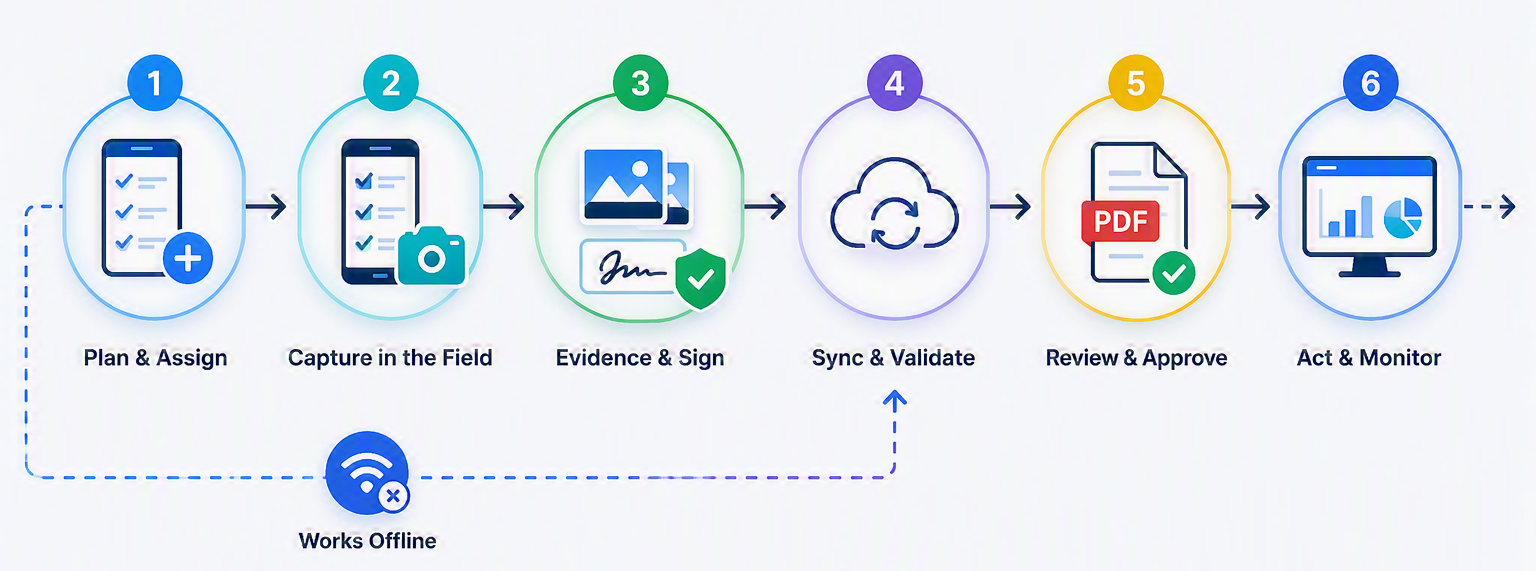
An offline field inspection app does more than replace paper with a digital form. It changes how teams run inspection workflows in real field conditions. Teams no longer work around poor connectivity or disconnected tools. Instead, a modern field inspection app keeps inspections moving from capture to approval to reporting in one structured flow.
Inspections Continue Without Connectivity
In remote sites, offshore environments, and other disconnected locations, an offline-first mobile inspection app allows field teams to continue capturing details, recording observations, and completing inspection steps even when connectivity drops. The work continues in the app and syncs when a connection becomes available.

Structured Data from the Start
Traditional inspection processes often produce inconsistent records because different people capture information in different ways. An offline-first Power Apps inspection app introduces structure at the point of entry through required fields, guided steps, checklist-based inspections, image capture, and digital signatures. That improves data quality before it reaches operations, QA, or reporting teams.
Automated Reporting Eliminates Bottlenecks
Reporting often becomes the slowest part of the inspection workflow. Teams must gather data, match photos, verify approvals, and assemble documents by hand. A well-designed offline inspection app connects field capture directly to reporting workflows. That setup supports PDF generation and reduces manual effort.
Why Microsoft Power Platform Is Ideal for Inspection Apps
Inspection teams do not always need a heavy custom software project. But they also cannot rely on a generic form tool that breaks in the field. Microsoft Power Platform offers a practical middle ground. It gives organizations the flexibility to build a custom inspection app around real field workflows while staying inside a governed enterprise platform.
A Power Apps inspection app can be designed to reflect how inspections are actually performed in the field rather than forcing teams into a rigid template. Inspection steps, required fields, image capture, digital signatures, approvals, and reporting workflows can all be structured around the process the business already needs to support. At the same time, the platform makes it easier to connect with SharePoint Online for data storage and Power Automate for workflow automation and reporting.
Managed Solution vs. Building from Scratch
Many organizations assume that if they need an inspection app tailored to their workflows, the only option is to build it from scratch. But inspection applications often need offline capability, image capture, digital signatures, automated reporting, approvals, role-based access, and evolving workflow requirements across sites and teams. Building all of that from zero can quickly become more complex than expected.
A managed solution changes the starting point. Instead of designing every capability from scratch, organizations begin with a proven inspection pattern that already supports the core building blocks of the workflow. That reduces risk, shortens time to value, and creates a stronger foundation for future changes.
A Real-World Example: Modernizing Field Inspections in Remote Environments
VNB recently worked with a mid-sized industrial services organization supporting energy-sector projects across remote and offshore locations. Inspection teams managed safety walkdowns, QA checks, daily summaries, and field documentation in environments with unreliable connectivity. The existing process relied on manual steps and disconnected tools.
To address this, VNB delivered an offline field inspection app on Microsoft Power Apps with SharePoint Online as the backend. The solution supported offline data capture, image capture, digital signatures, structured inspection checklists, and automated PDF reporting within a more connected workflow. The result was a more reliable inspection process across sites, with improved reporting speed, better visibility for operations and QA teams, and less manual effort spent reconciling records after the work was completed.
The Future of Inspections Is Structured, Mobile, and Offline First
Inspection programs are becoming too important to remain dependent on paper, disconnected tools, and reporting processes that slow action down. As field operations grow more complex, organizations need inspection workflows that are consistent, traceable, and built for the environments where the work actually happens.
For field service leaders, the opportunity is not only to replace manual forms. It is to build a more dependable inspection process from the start — one where data is captured in the right format, evidence is connected to the inspection record, approvals happen within the workflow, and reporting no longer becomes a separate manual exercise. A well-designed offline field inspection app creates that foundation while making it easier to scale across teams, sites, and changing operational requirements.