Power BI for Capex

Plan and Track Capital Spend and Investments with Greater Precision

VNB Consulting’s Power BI for Capex Dashboards empower organizations to gain clear visibility into their financial performance and capital investments. With intuitive visuals and drill-through capabilities, these dashboards help transform raw data into actionable insights—enabling smarter planning, prioritization, and alignment with strategic objectives.

Our content pack highlights Capital Spend, Capital Hours, and Vendor Information, giving a comprehensive view of how resources are allocated and utilized across fiscal years.

    Get a Free Quote

    Capex Dashboard - Capital Spend Summary

    Capital Spend Summary

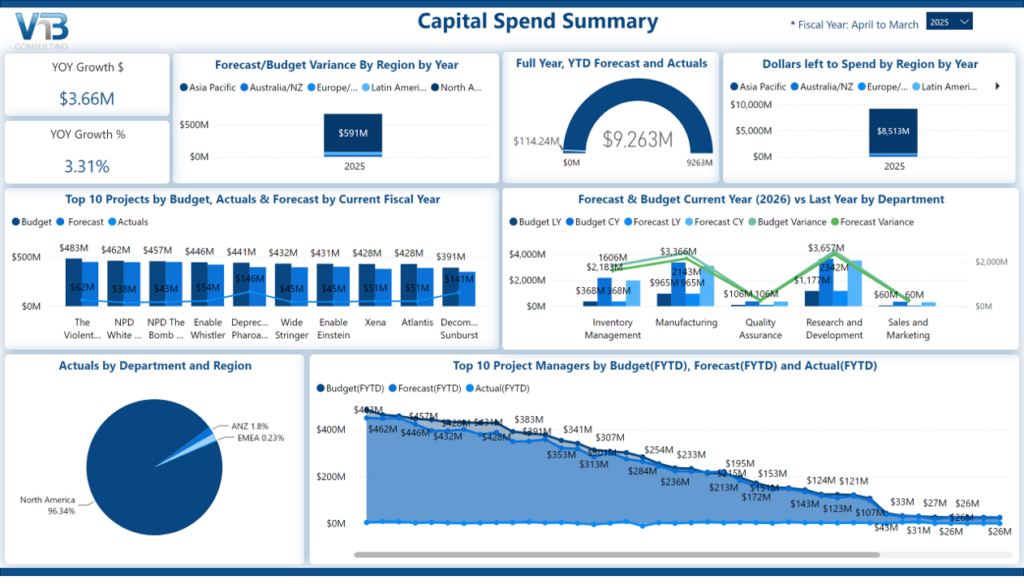
    The Capital Spend Summary dashboard provides a high-level view of financial performance:

    • Review the top 10 projects and project managers
    • View year-over-Year (YoY) forecast compared to budget variances
    • Monitor remaining dollars available to spend
    • Check actual spending across departments

    Organizations can quickly assess Growth $, Growth %, and differences between forecasted and actuals. Interactive charts let users dive into detailed reports on spending, hours, or vendors. Users can also compare forecasts and budgets from the current year with those from the previous year, organized by region and department.

    Capital Spend Details

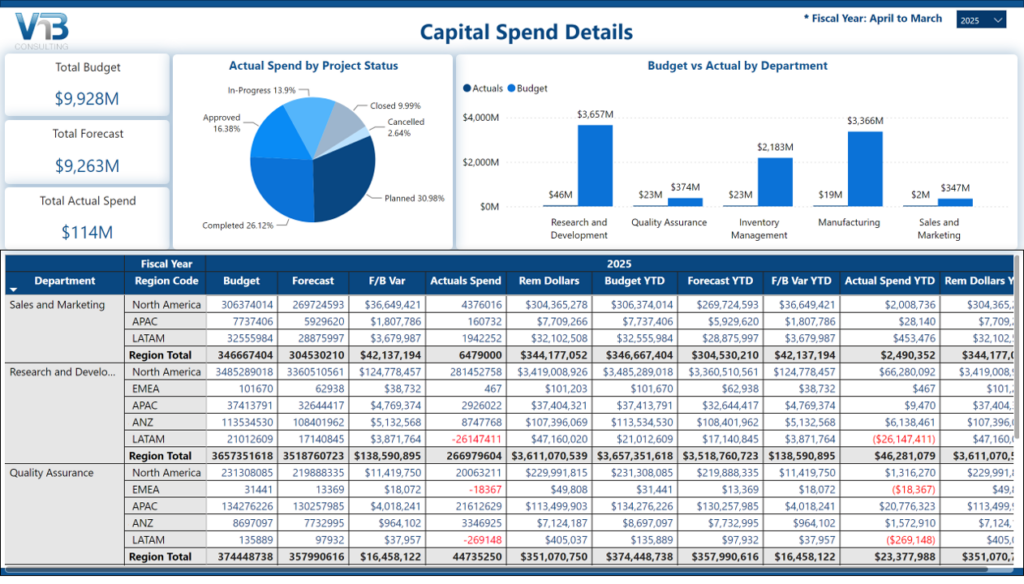
    The Capital Spend Details dashboard provides a detailed view of capital expenditure performance by department and region for a selected fiscal year. Key metrics include:

    • Total budget
    • Total forecast
    • Total actual spend
    • Forecast-to-Budget variance
    • Remaining dollars
    • Total Year-to-date (YTD) spend

    This dashboard supports deeper financial review by helping teams track performance against targets and identify areas for optimization.

    Capital spend details Power BI dashboard
    Capital Hours Summary - Power BI for Capex Report

    Capital Hours Summary

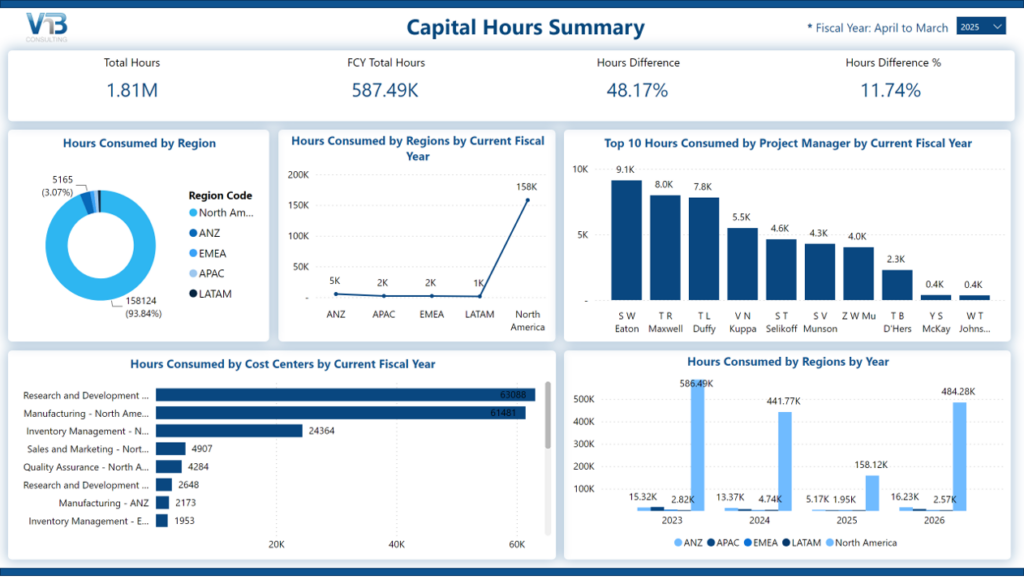
    The Capital Hours Summary dashboard highlights resource allocation and workforce impact. It provides a consolidated view of labor utilization, regional distribution, and hours consumed across key business areas. Key metrics include:

    • Total hours, FCY total hours, Hours Difference, and Hours Difference %
    • Top 10 actual hours by vendor, department, and cost center
    • YoY comparisons of actual hours consumed by department and cost center

    This dashboard helps organizations monitor workload distribution and understand where project effort is concentrated. It also supports analysis of regional and cost center usage to identify efficiency patterns over time.

    Capital Hours Detail

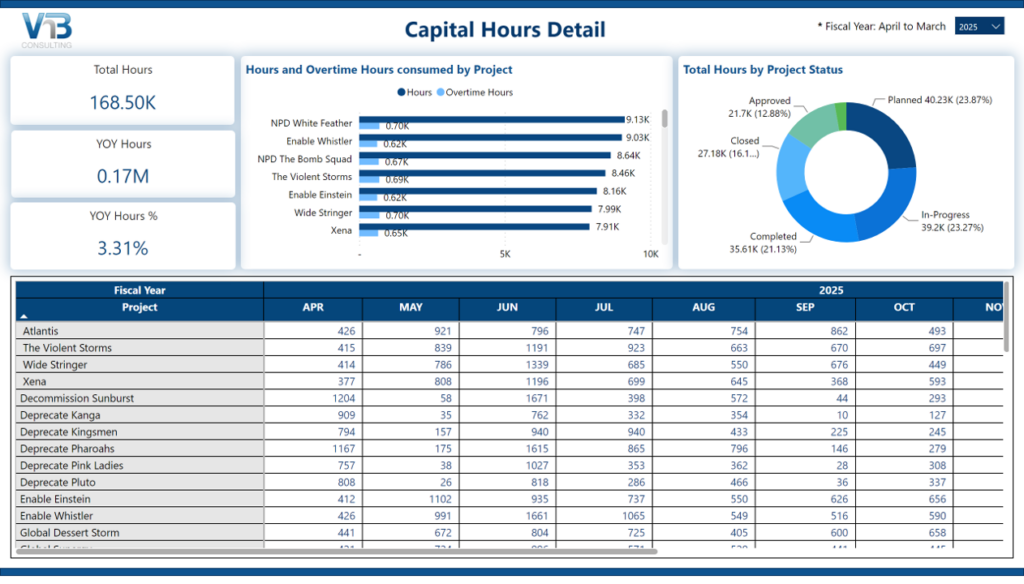
    The Capital Hours Detail dashboard provides project-level insights for a selected fiscal year. Key metrics include:

    • Total hours, YoY hours, YoY hours %
    • Hours tracked by project, project manager, and task
    • Task duration trends by fiscal month and year

    This dashboard helps teams track project-level effort, resource utilization, and project execution timelines.

    Capital hour detail - Power BI report to track capital expenditure
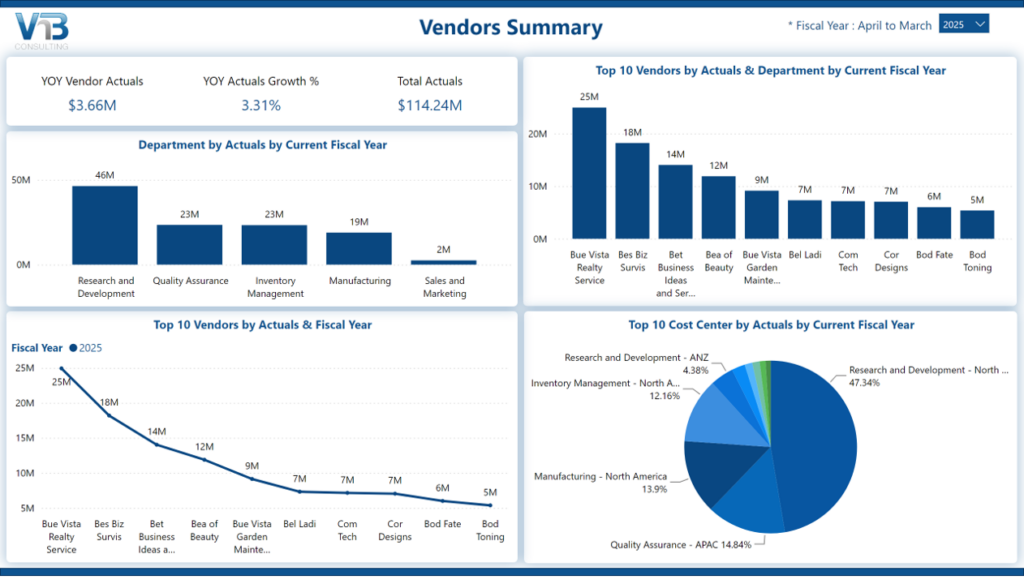
    Vendor Summary Power BI Dashboard

    Vendor Summary

    The Vendor Summary Dashboard provides a consolidated view of Capex spend across vendors, highlighting overall performance, key trends, and major cost drivers. It brings together KPIs, top vendors, and department-wise allocations to give a quick understanding of where investments are concentrated. Key metrics include:

    • YoY vendor actuals, vendor actuals growth %, total actuals
    • Top 10 actual spend by vendor, department, and cost centers

    This helps organizations track overall spend, identify top vendors, and analyze how costs are distributed across departments and regions.

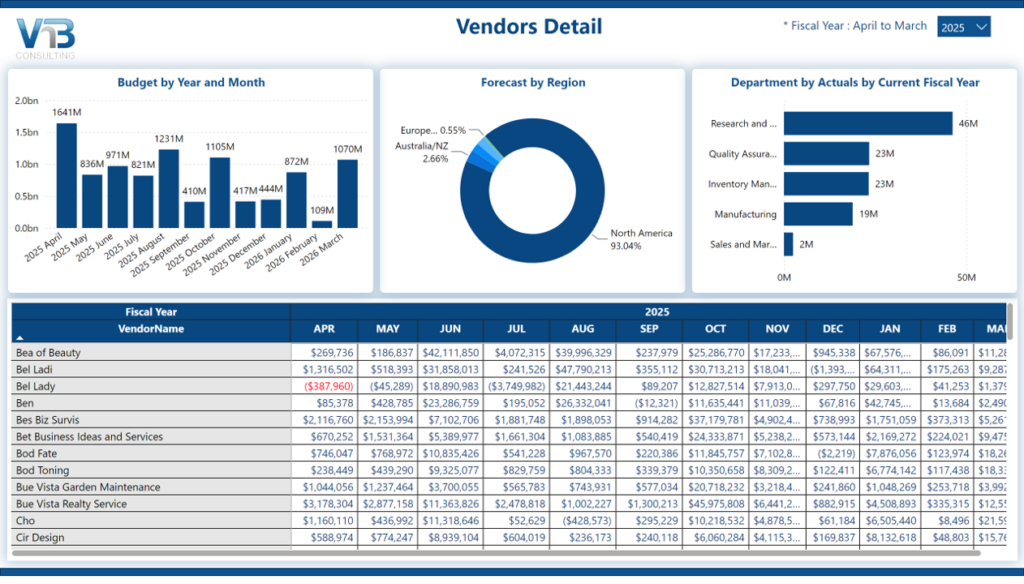
    Vendor Details

    The Vendor Details dashboard provides a more detailed view of Capex spend, combining budget trends, regional forecasts, and vendor-level breakdowns. It enables deeper visibility into spending patterns and supports accurate financial tracking. Key metrics include:

    • Budget by year and month
    • Forecast by region
    • Department by actuals for the current fiscal year
    • Vendor-level monthly financial details across the fiscal year

    This dashboard helps teams monitor monthly budgets, analyze regional allocation, and drill down into vendor performance with detailed data and helps with variance analysis, reconciliation, and operational insights.

    Capital Expenditure Report - Vendor Details

    Power BI for Capex

    Plan and Track Capital Spend and Investments with Greater Precision

    VNB Consulting’s Power BI for Capex Dashboards empower organizations to gain clear visibility into their financial performance and capital investments. With intuitive visuals and drill-through capabilities, these dashboards help transform raw data into actionable insights—enabling smarter planning, prioritization, and alignment with strategic objectives.

    Our content pack highlights Capital Spend, Capital Hours, and Vendor Information, giving a comprehensive view of how resources are allocated and utilized across fiscal years.

      Get a Free Quote

      Capital Spend Summary

      Capex Dashboard - Capital Spend Summary

      The Capital Spend Summary dashboard provides a high-level view of financial performance:

      • Review the top 10 projects and project managers
      • View year-over-Year (YoY) forecast compared to budget variances
      • Monitor remaining dollars available to spend
      • Check actual spending across departments

      Organizations can quickly assess Growth $, Growth %, and differences between forecasted and actuals. Interactive charts let users dive into detailed reports on spending, hours, or vendors. Users can also compare forecasts and budgets from the current year with those from the previous year, organized by region and department.

      Capital Spend Details

      Capital spend details Power BI dashboard

      The Capital Spend Details dashboard provides a detailed view of capital expenditure performance by department and region for a selected fiscal year. Key metrics include:

      • Total budget
      • Total forecast
      • Total actual spend
      • Forecast-to-Budget variance
      • Remaining dollars
      • Total Year-to-date (YTD) spend

      This dashboard supports deeper financial review by helping teams track performance against targets and identify areas for optimization.

      Capital Hours Summary

      Capital Hours Summary - Power BI for Capex Report

      The Capital Hours Summary dashboard highlights resource allocation and workforce impact. It provides a consolidated view of labor utilization, regional distribution, and hours consumed across key business areas. Key metrics include:

      • Total hours, FCY total hours, Hours Difference, and Hours Difference %
      • Top 10 actual hours by vendor, department, and cost center
      • YoY comparisons of actual hours consumed by department and cost center

      This dashboard helps organizations monitor workload distribution and understand where project effort is concentrated. It also supports analysis of regional and cost center usage to identify efficiency patterns over time.

      Capital Hours Detail

      Capital hour detail - Power BI report to track capital expenditure

      The Capital Hours Detail dashboard provides project-level insights for a selected fiscal year. Key metrics include:

      • Total hours, YoY hours, YoY hours %
      • Hours tracked by project, project manager, and task
      • Task duration trends by fiscal month and year

      This dashboard helps teams track project-level effort, resource utilization, and project execution timelines.

      Vendor Summary

      Vendor Summary Power BI Dashboard

      The Vendor Summary Dashboard provides a consolidated view of Capex spend across vendors, highlighting overall performance, key trends, and major cost drivers. It brings together KPIs, top vendors, and department-wise allocations to give a quick understanding of where investments are concentrated. Key metrics include:

      • YoY vendor actuals, vendor actuals growth %, total actuals
      • Top 10 actual spend by vendor, department, and cost centers

      This helps organizations track overall spend, identify top vendors, and analyze how costs are distributed across departments and regions.

      Vendor Details

      Capital Expenditure Report - Vendor Details

      The Vendor Details dashboard provides a more detailed view of Capex spend, combining budget trends, regional forecasts, and vendor-level breakdowns. It enables deeper visibility into spending patterns and supports accurate financial tracking. Key metrics include:

      • Budget by year and month
      • Forecast by region
      • Department by actuals for the current fiscal year
      • Vendor-level monthly financial details across the fiscal year

      This dashboard helps teams monitor monthly budgets, analyze regional allocation, and drill down into vendor performance with detailed data and helps with variance analysis, reconciliation, and operational insights.